
AI Automation Scale without hiring.
Build systems that do real work: reading, deciding, writing, replying.On the tools you already use.
Get in touchOur process
A low-risk approach that starts with understanding your business.
-
Audit
We map how the work moves through your team today.
-
Build
We build and test on your real data. Usually live in days.
-
Hand over
You own it on your own instance, with notes and a walkthrough.
The work these teams stopped doing by hand.
Each one replaced a job somebody did.
-
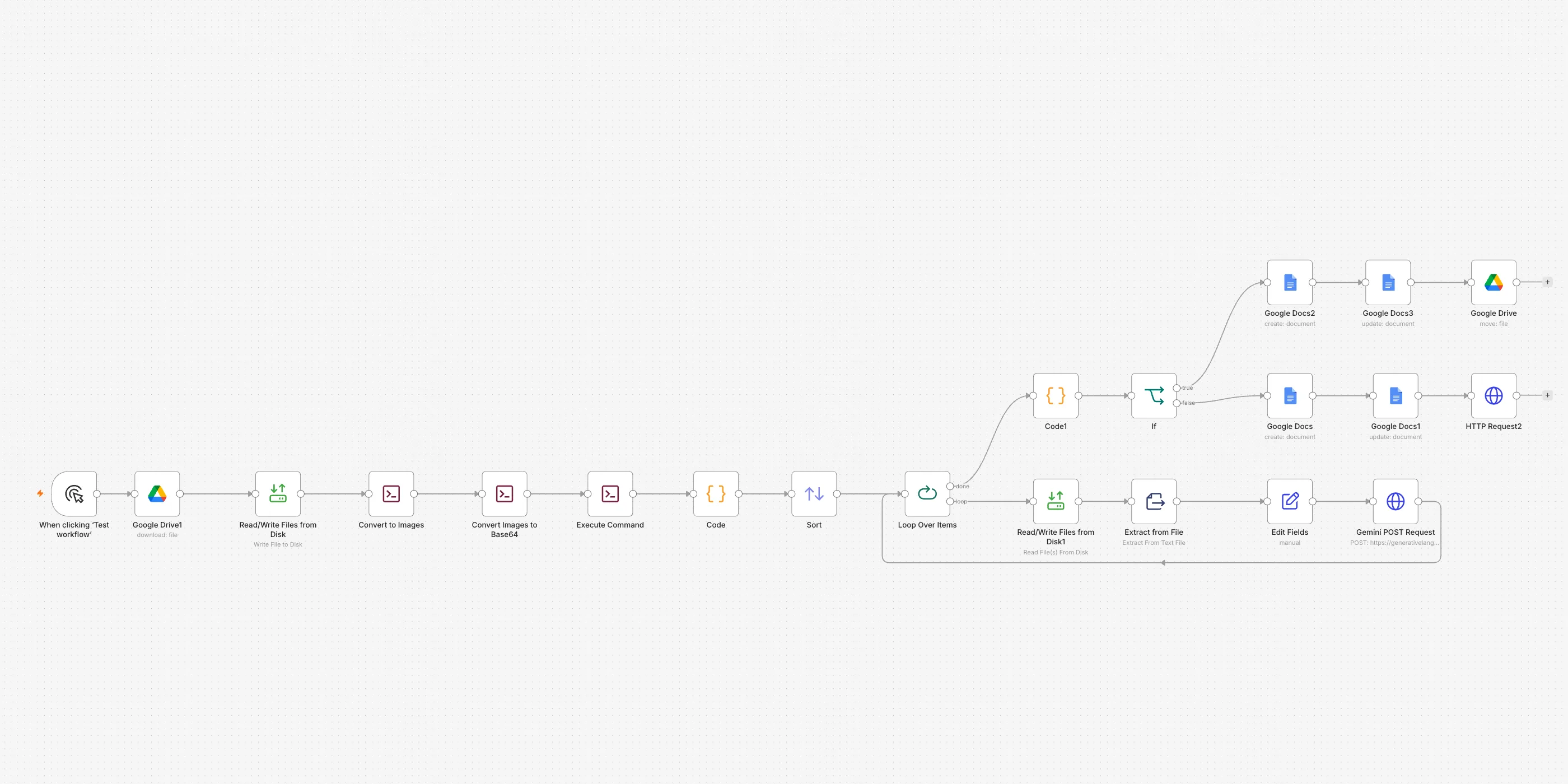 Paperwork & data entry
Scanned PDFs made searchable
A scanned PDF becomes a document you can search, copy and edit.
Every page is read as a picture, so even a photocopy works.
- Google Drive
- Gemini AI
- Google Docs
- SituationWhat was happening
A scanned catalog is really just photographs of paper. You cannot search it, copy a line out of it, or correct a single word. The only way to reuse any of it is to retype the pages by hand.
- TaskWhat had to change
The words on every page had to become real text again, in the right order, back in Drive where the team already works.
- ActionWhat we built
- We point the system at the PDF in Google Drive and start the run.
- The file is split into pictures, one per page.
- Gemini AI reads each picture and pulls the words off it.
- The pages are kept in their original order and joined into one text, with a break between each page.
- A Google Doc is created from that text, named after the original file, and filed in the right folder.
- The finished document is exported back out as a PDF.
- ResultWhat it changed
- The words in a scanned file can be searched, copied and edited like any other document.
- Page order is kept, so the document still reads like the original.
- Nobody retypes a page.
-
 Paperwork & data entry
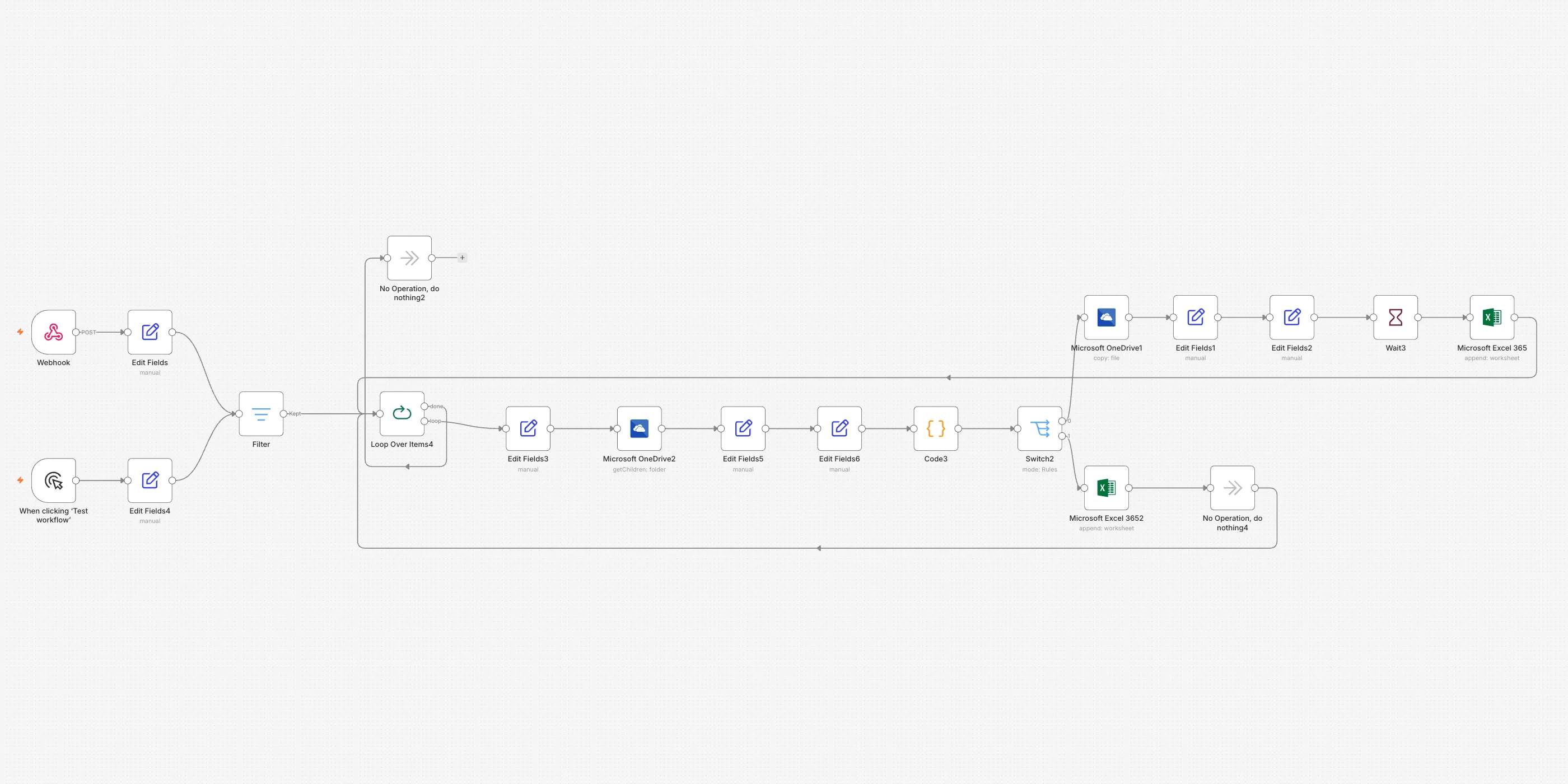
Invoices filed into the right spreadsheet
Each invoice is added to the right vendor's spreadsheet, on its own.
Date, amount and tax land in the right columns by themselves.
- OneDrive
- Excel
- SituationWhat was happening
Every vendor has their own spreadsheet. When an invoice comes in, somebody has to work out whose it is, find that file, open it, and type the dates, the amount and the tax into the right columns. A vendor nobody has billed before has no file at all, so the master template gets copied and renamed by hand first.
- TaskWhat had to change
Each invoice had to reach its own vendor's spreadsheet with the figures in the right columns, and a brand-new vendor had to get a spreadsheet of their own without anyone making one.
- ActionWhat we built
- An invoice arrives with the vendor, the dates, the amount and the tax already read off it.
- Anything that is not a finished invoice is dropped, so only invoices marked ready carry on.
- The invoices are handled one at a time.
- We list the vendor folder in OneDrive and look for a file named after that vendor.
- If the file is there, the invoice is written into it as a new row.
- If it is not, the master template is copied into the vendor folder under the vendor's name, and the first row is written into the fresh file.
- The run moves on to the next invoice.
- ResultWhat it changed
- Every invoice lands in its own vendor's spreadsheet, in the right columns.
- A vendor seen for the first time gets a spreadsheet made from the master template, named after them.
- Nobody opens a file to type a row.
-
 Paperwork & data entry
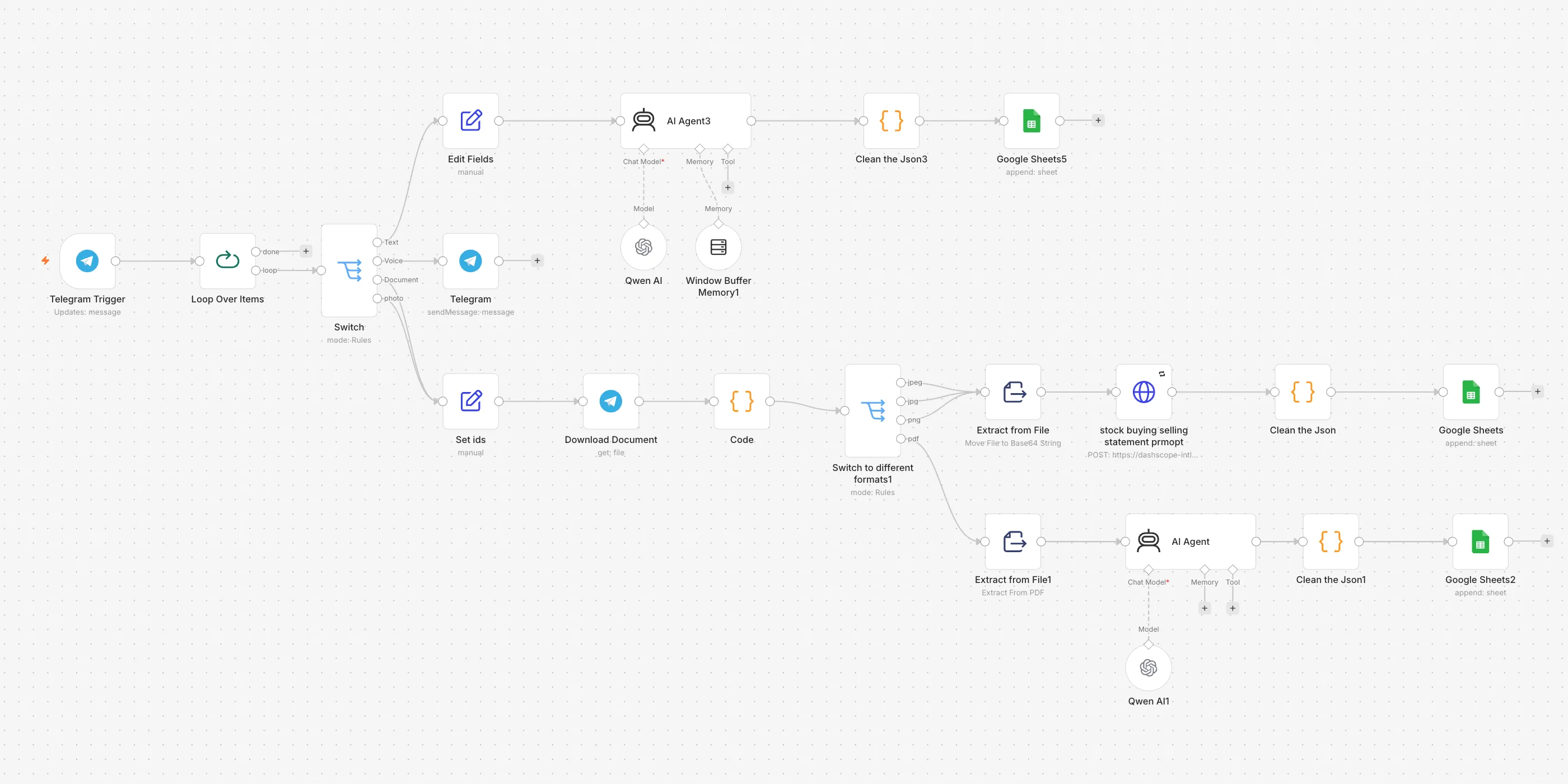
An accountant in your pocket
Photograph a contract note, send it to Telegram, and the trade is logged.
A photo, a PDF and a typed message each take their own route.
- Telegram
- Qwen AI
- Google Sheets
- SituationWhat was happening
Every trade turns up as a contract note: a photo from the broker app, a PDF by email, or a line typed out from memory. Somebody opens the portfolio sheet and types the date, the ticker, whether it was a buy or a sell, the units and the price into five columns. Miss one and the portfolio stops adding up.
- TaskWhat had to change
A trade sent to Telegram in any form had to become one correct row in the transactions sheet, with the type only ever one of the seven the sheet accepts.
- ActionWhat we built
- A message arrives in Telegram and the messages are handled one at a time.
- The system sorts each one by what was sent: a typed message, a voice note, a file or a photo.
- A typed message goes straight to the AI, which reads the trade out of the sentence.
- A photo or a file is downloaded from Telegram and its kind worked out from the file extension.
- A photo goes to an AI that reads pictures, so a phone snap of a contract note is enough.
- A PDF has its text pulled out first, and the AI reads that.
- A voice note gets a short reply asking for a photo or text instead, so nothing is logged from a guess.
- Every route hands back the same five fields, and anything not clearly on the page is left blank rather than guessed.
- That answer is turned back into data and added to the transactions tab as a new row.
- ResultWhat it changed
- A trade is logged by sending a photo, a file or a sentence — no spreadsheet is opened.
- Date, ticker, type, units and price always land in the same five columns.
- The type column only ever holds one of the seven values the sheet allows.
- A figure that cannot be read is left empty instead of invented.
-
 Paperwork & data entry
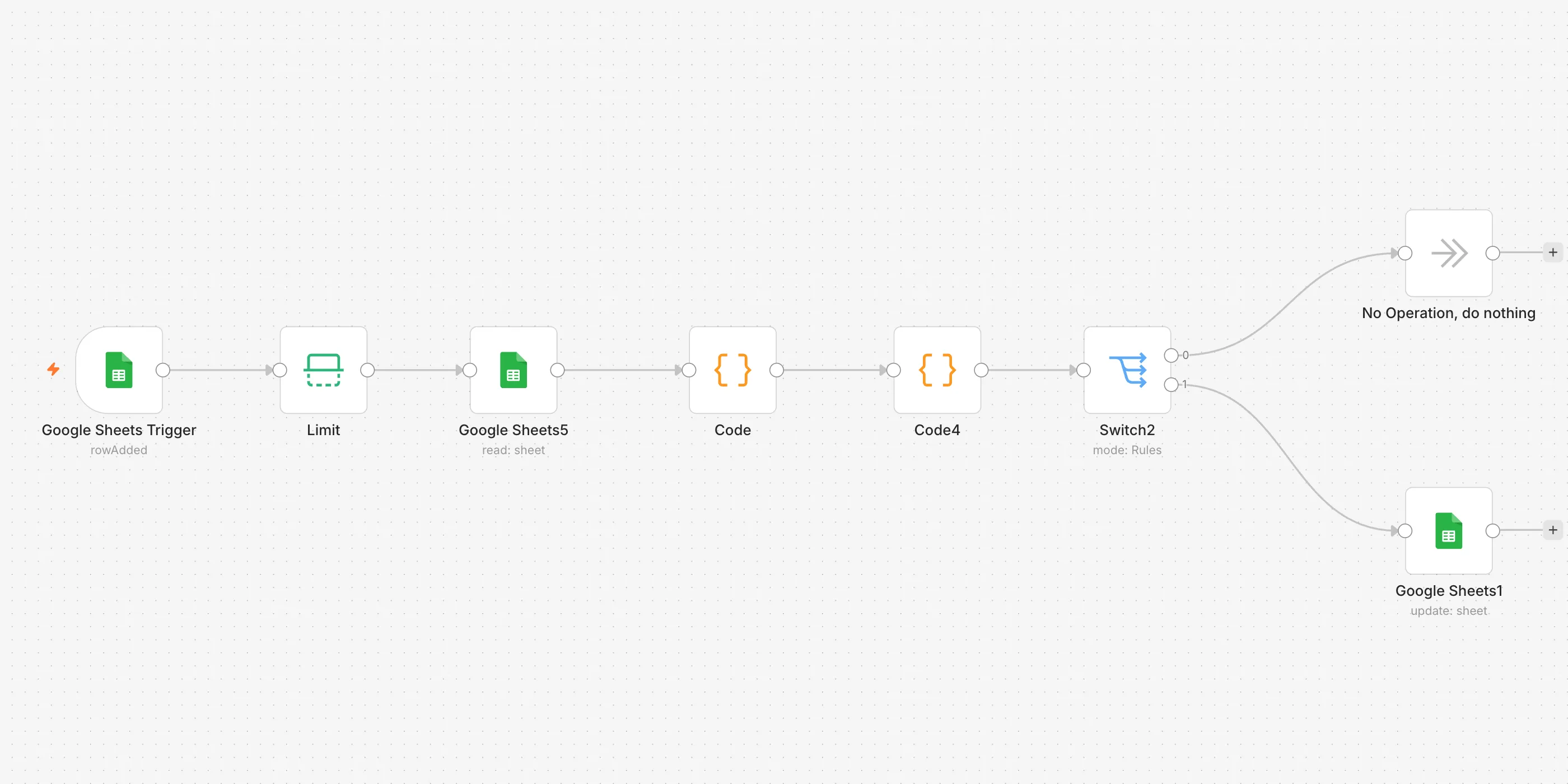
Duplicate rows erased automatically
Watches a sheet and empties duplicate entries within a minute of them landing.
Runs quietly in the background, no clicks needed.
- Google Sheets
- SituationWhat was happening
The invoice sheet keeps growing as new rows arrive. Now and then the same invoice gets logged twice, so the same vendor, date, amount and document number sit in the sheet in two places. Somebody has to read down the sheet, spot the repeat, and clear it out by hand. A repeat that gets missed is counted twice.
- TaskWhat had to change
Every new row had to be checked against the rest of the sheet on its own, and an exact repeat had to be cleared out without anyone looking for it.
- ActionWhat we built
- The sheet is checked every minute for a row that has been added.
- Only the newest row is kept, so one run handles one arrival.
- The whole sheet is read back in.
- Every value is turned into plain text, so dates and figures compare like for like.
- Each row is boiled down to one key made from its received date, document date, vendor, total amount, document type, currency, document number and status.
- The first time a key is seen it is kept. Any row whose key has been seen already is marked as a duplicate.
- If nothing repeats, the run stops there and the sheet is left alone.
- If there are duplicates, each one is found by its row number and every column in that row is emptied.
- ResultWhat it changed
- A repeated row is emptied out on its own, with nobody watching the sheet.
- The sheet is checked every minute, so a repeat does not sit there long.
- A row only counts as a duplicate when it matches on all eight of those fields, so two rows that differ in any of them are both left alone.
- The first copy always stays. Only the later one is cleared.
-
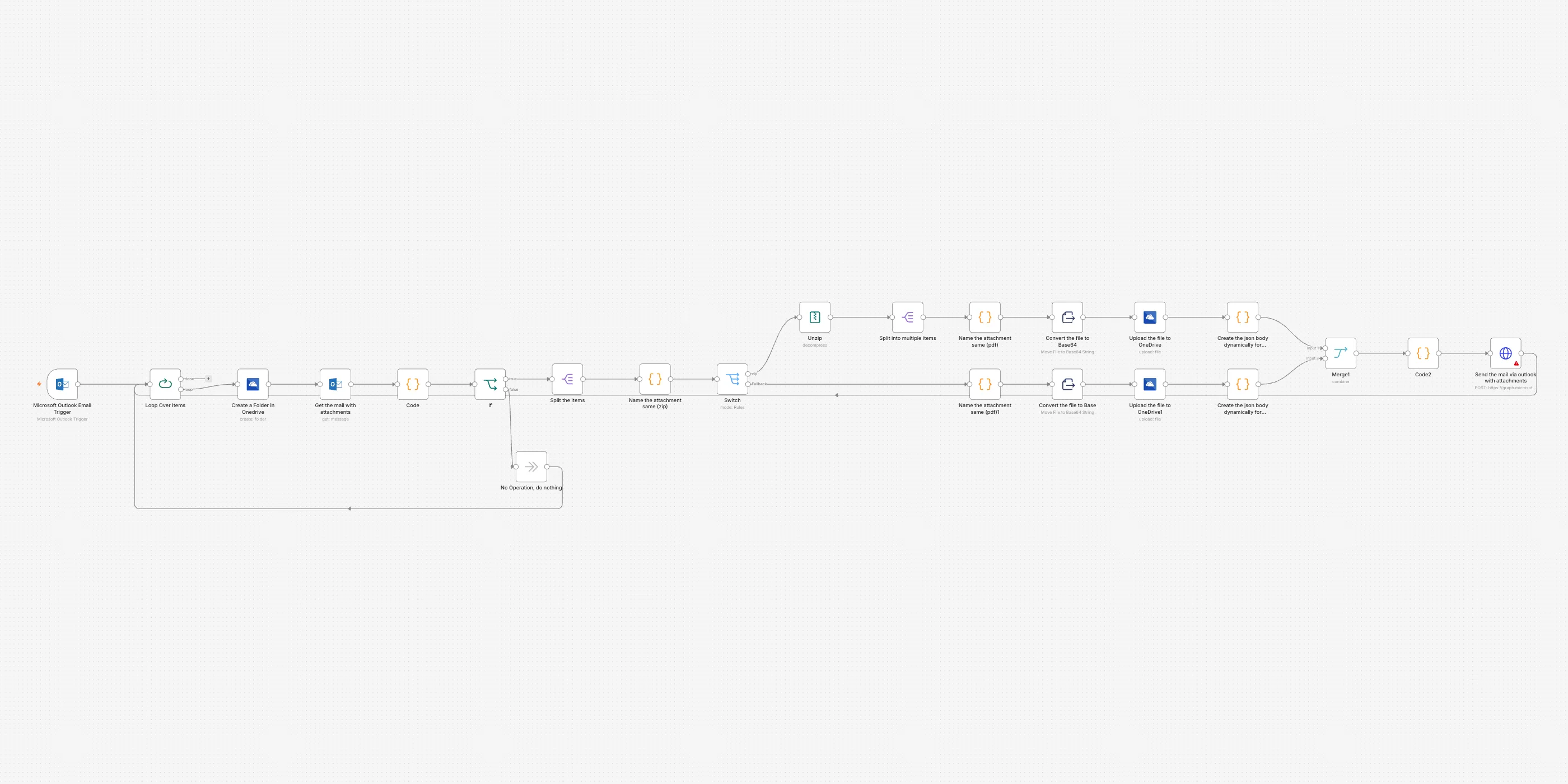 Paperwork & data entry
Email attachments unpacked and filed
Pulls attachments out of email, unzips them and files them in a dated folder.
Opens .zip files and files what is inside.
- Outlook
- OneDrive
- SituationWhat was happening
Files come in by email, and the ones that matter arrive squashed into a .zip. Someone has to open the email, download the zip, unpack it on their own machine, then drag every file into the shared folder so the rest of the team can find it. After that they write a fresh email and attach the loose files again, because the person waiting on them cannot open a zip. It is a long stretch of clicking for every message, and it holds up whoever is waiting on the files.
- TaskWhat had to change
Mail arriving with a zip had to be unpacked on its own, every file inside saved to a shared folder, and the whole set passed on as ordinary attachments in a single email.
- ActionWhat we built
- We watch one Outlook folder and check it for new mail every minute.
- Emails are handled one at a time.
- A new folder is made in OneDrive, named with the date and time.
- The email is opened again and its attachments are downloaded.
- We check whether anything attached is a .zip; if nothing is, that email is left alone and the run moves on.
- The attachments are split up so each one is handled on its own.
- A .zip is opened and every file inside comes out; anything that is not a zip carries straight on.
- Each file is uploaded into the new OneDrive folder.
- All the files are gathered back into one list and sent on in a single email to one fixed address, keeping the original subject and a short preview of the original message.
- The run moves on to the next email.
- ResultWhat it changed
- Files that arrive squashed into a .zip come out as ordinary attachments.
- Every file from a mail that carries a zip is saved in OneDrive, in a folder stamped with the date and time.
- The whole set goes on in one email to a fixed address, under the original subject.
- Nobody downloads, unzips or re-attaches anything by hand.
-
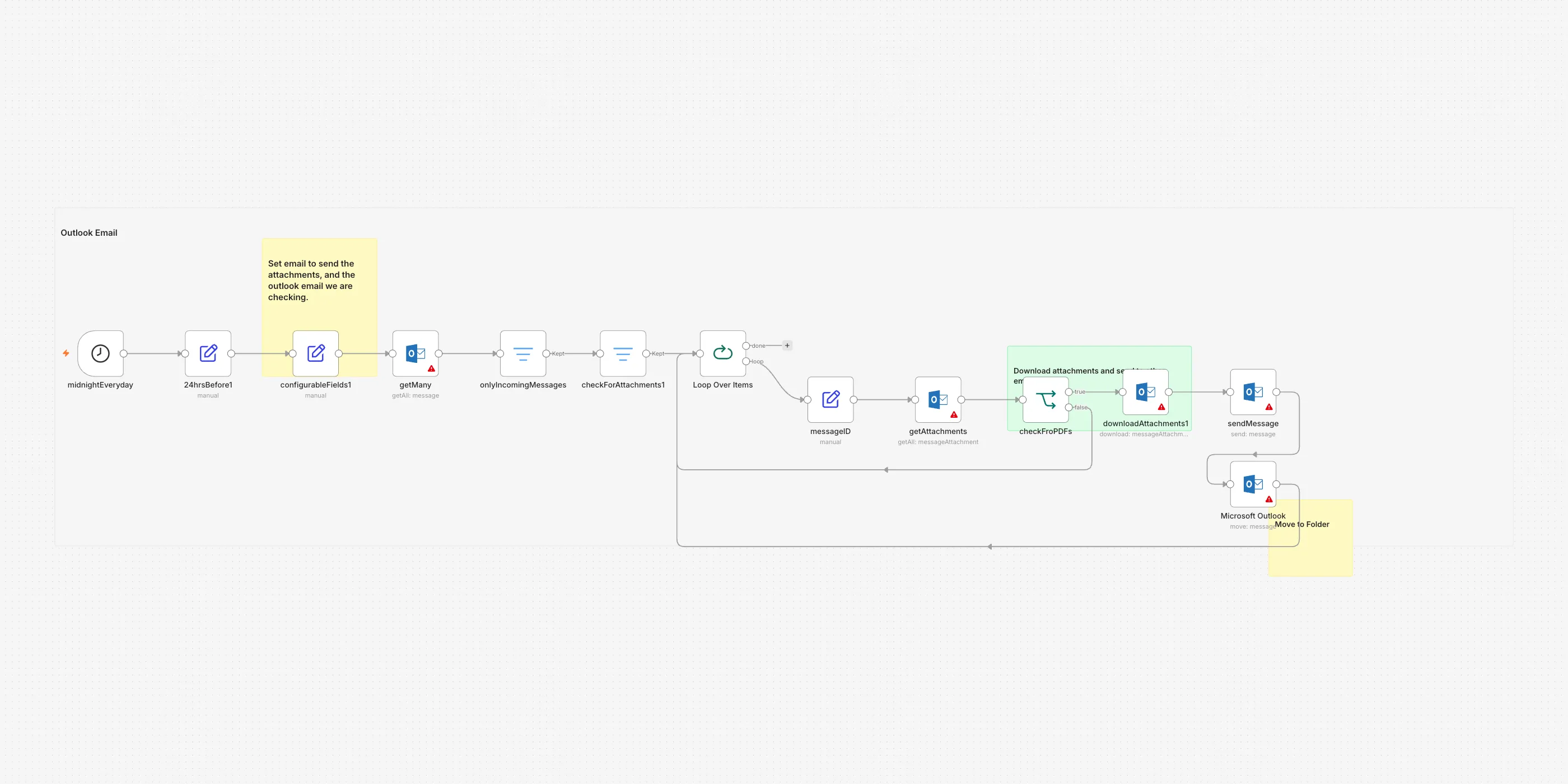 Paperwork & data entry
Only the PDFs get forwarded
Once a day, the PDFs that came in by email are forwarded to one address.
Mail sent from the mailbox itself is skipped, so its own messages are never forwarded on.
- Outlook
- SituationWhat was happening
Attachments come into the Outlook mailbox all day, and only some of them are PDFs. Somebody has to open every message, look at what is attached, and forward the PDF on to the person who handles it. Anything that is not a PDF has to be passed over by hand. It is a few minutes each time, every day, and it only works if someone remembers.
- TaskWhat had to change
Every PDF that arrived in the last day had to reach one chosen address on its own, without anyone opening a message.
- ActionWhat we built
- The run starts on its own, once a day.
- It works out the cut-off: anything that arrived in the last 24 hours.
- The address to forward to and the mailbox's own address are set in one place, so they are easy to change.
- Outlook hands back every message received since the cut-off.
- Mail sent from the mailbox itself is dropped, so only incoming messages carry on.
- Messages with nothing attached are dropped too.
- The rest are handled one at a time.
- For each message, the attachments are listed. The PDFs carry on; anything else sends the run straight to the next message.
- Each PDF is downloaded and sent on to the chosen address in its own email.
- The message it came from is moved to the Outlook folder named on that step, which is currently the Inbox.
- ResultWhat it changed
- PDFs are forwarded within the day, without anyone opening the mailbox.
- Attachments that are not PDFs are left alone.
- A message is moved in Outlook once its PDFs have gone out. That step points at the Inbox today, so nothing is filed away until a folder is picked.
- The forwarding address and the mailbox's own address live in one step, so changing either does not mean rebuilding anything.
-
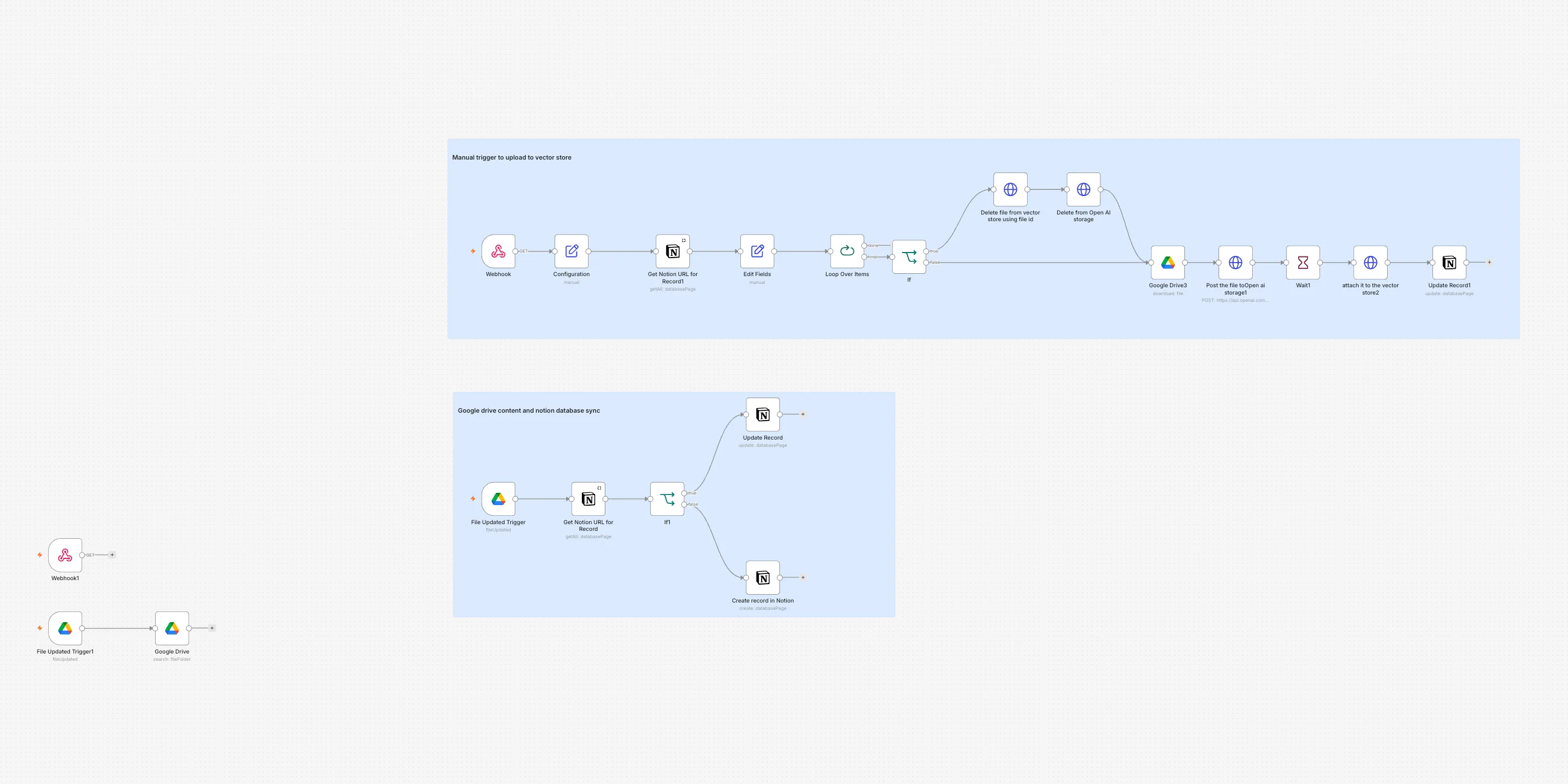 Systems in sync
Drive files, mirrored into Notion
Every file added or changed in a Drive folder shows up as a Notion record.
The Drive folder is checked every minute.
- Google Drive
- Notion
- SituationWhat was happening
The files live in a Google Drive folder, but the team plans and tracks its work in Notion. Somebody has to open Drive, spot what is new, and add a record in Notion with the file's name and a link back to it. When a file is edited afterwards, that record quietly goes stale and nobody notices. The two lists drift apart until someone sits down and reconciles them by hand.
- TaskWhat had to change
Every file in that Drive folder had to have a matching record in Notion, created the first time the file turns up and kept current every time it changes.
- ActionWhat we built
- We watch one folder in Google Drive and check it every minute.
- A file that has just been saved or edited in that folder is picked up on its own.
- We search the Notion database for a record whose Drive file id matches that file.
- If a record is already there, its last-modified date is refreshed and its "ready for sync" tick box is cleared.
- If there is no record yet, a new one is created with the file's name, its Drive id, the date it was modified and a link that opens the file.
- Each record carries a "ready for sync" tick box. The workflow leaves it unticked, so someone ticks the files they want sent on to the company's AI knowledge store.
- ResultWhat it changed
- Every file that is added or edited in the Drive folder gets its own record in Notion.
- A new file gets its own record, with a link that opens it directly.
- An edited file has its date refreshed instead of being added a second time.
- Nobody keeps a second list by hand.
-
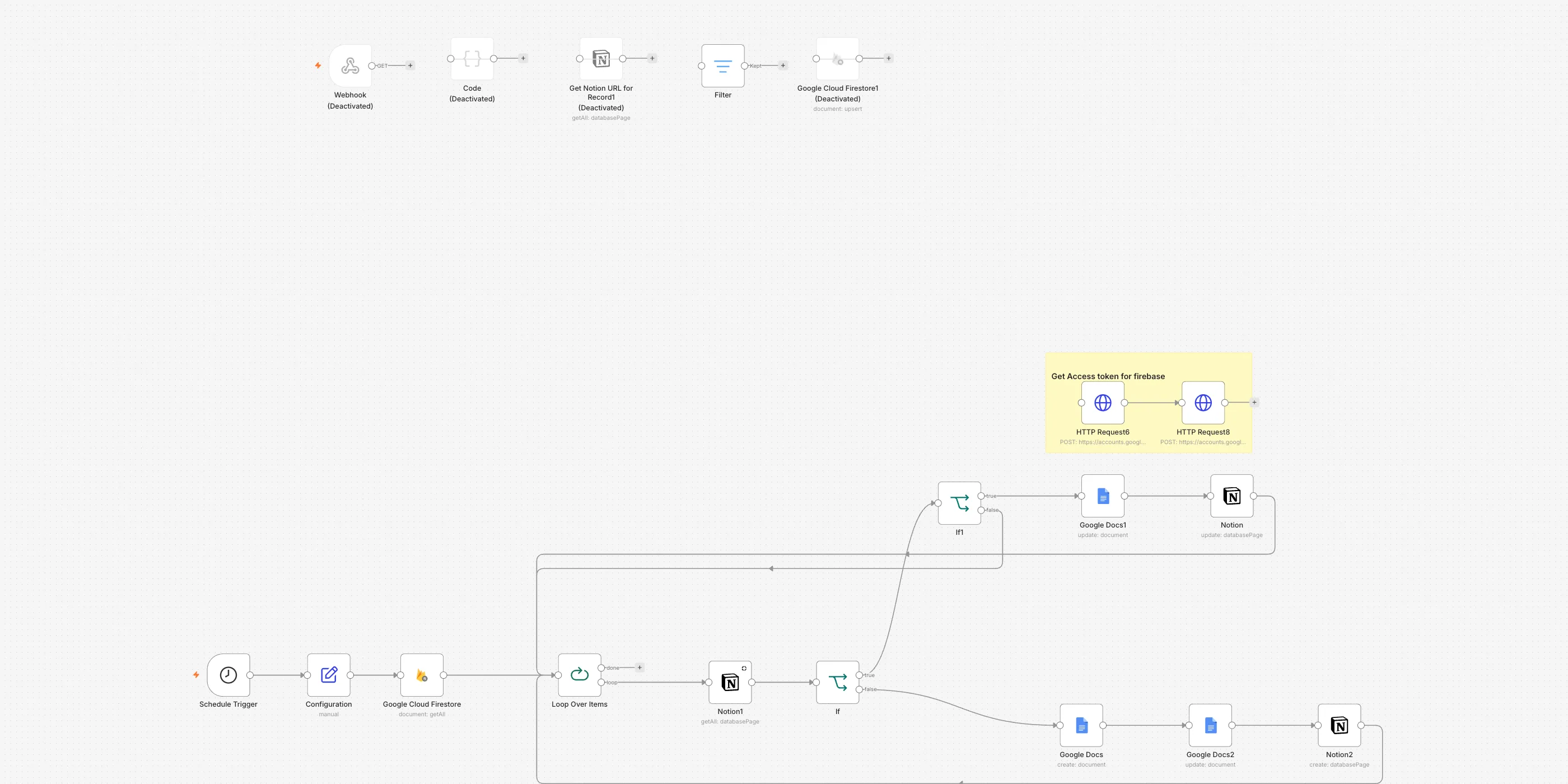 Systems in sync
Database records become shareable documents
New records turn into their own documents and get logged automatically.
Checks every minute and never repeats a record.
- Firestore
- Google Docs
- Notion
- SituationWhat was happening
The questions and answers customers get are held in the app's own database, where nobody outside the app can read them. To share one, somebody had to open the database, copy the question and the answer into a document, put it in the shared folder, and add a line to Notion saying where that document lives. When an answer was later edited in the app, the document was already out of date and nobody knew which ones to go back and fix.
- TaskWhat had to change
Every question and answer in the database had to have its own document in the shared folder, listed in Notion with a link, and had to be brought back up to date on its own whenever the answer changed.
- ActionWhat we built
- The system wakes up on its own, once a minute.
- It reads its settings first, including which Notion database to log into.
- It pulls the question-and-answer records out of the database.
- The records are handled one at a time.
- For each one, it looks in Notion for a page filed under that record's id.
- If there is no page, a new Google Doc is created in the shared folder, named with the record's id, and the question and answer are written into it.
- A Notion row is then added with the record's id, the question and answer, the document's name, a link straight to it, and the time the record was last changed.
- If a page is already there, the time on the Notion row is compared with the time on the database record.
- If they match, nothing is touched and the run moves on.
- If they differ, the document is opened from the link on the Notion row, the current question and answer are added to it, and the Notion row is refreshed.
- ResultWhat it changed
- Up to 500 records are read on each pass, and each one gets its own document in the shared folder.
- Notion holds the list, with the content, the document name and a link straight to it.
- An answer edited in the app is added to its document on the next pass.
- A record nothing has happened to is skipped, so no document is ever made twice.
-
 Systems in sync
Scheduler addresses that update in one click
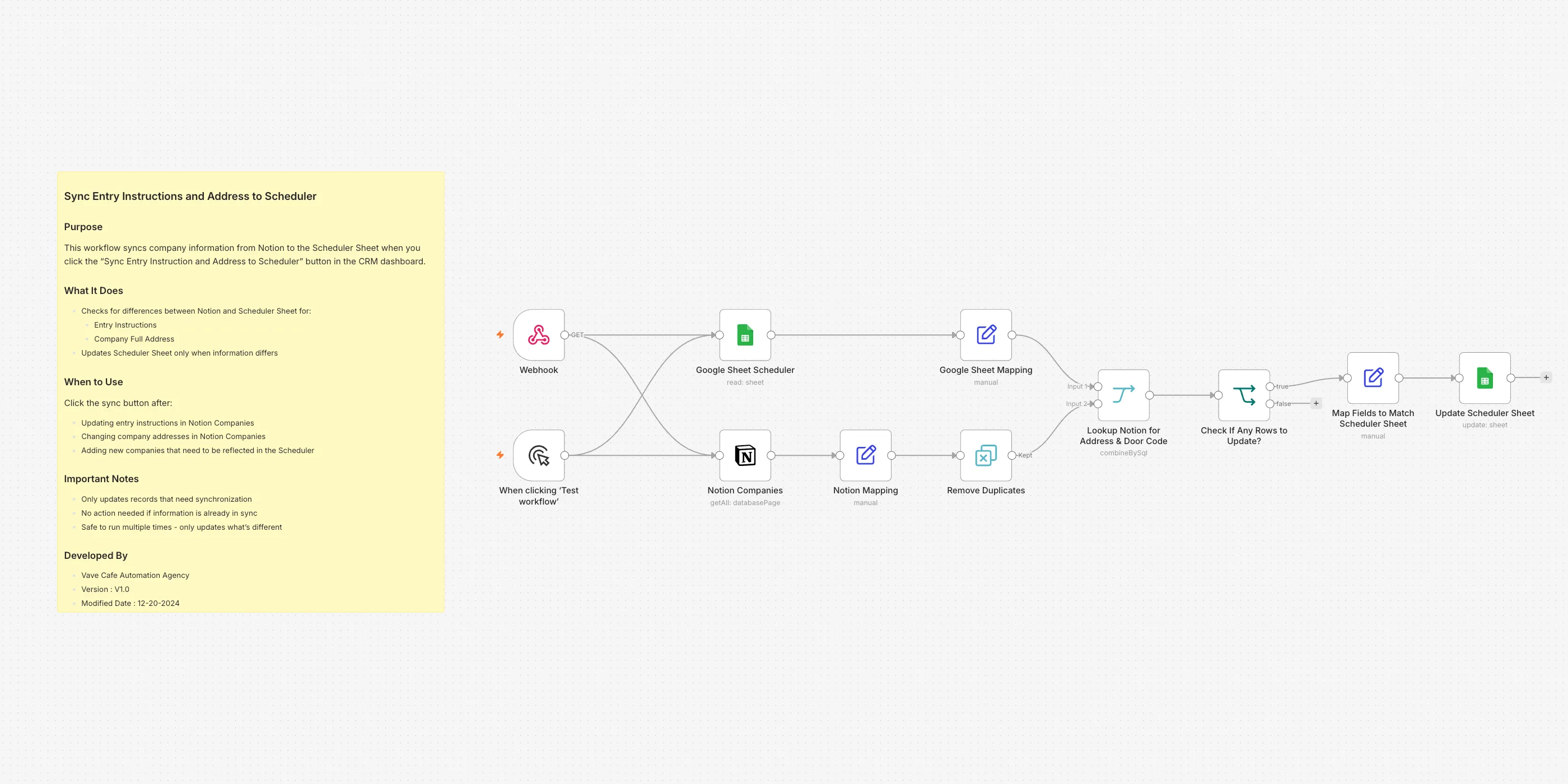
Addresses and access notes flow from Notion into the scheduling sheet.
Only changed rows are rewritten.
- Notion
- Google Sheets
- SituationWhat was happening
Every row of the scheduling sheet carries a site address and the door code and entry instructions, and points at a company through the account number on the front of its description. The same details also live in Notion, and Notion is where people actually change them. So a door code updated in Notion sat there until somebody found that company's rows in the sheet and retyped it. Rows went stale quietly, and a stale row means the person on shift turns up at the wrong address or cannot get in the door.
- TaskWhat had to change
The address and entry instructions on every row of the scheduling sheet had to match Notion, without anyone reading the two lists side by side.
- ActionWhat we built
- The run starts when something calls its web address, which is what the sync button in the dashboard is there to do.
- Two lists are pulled at the same time: every row of the scheduling sheet, and every company in Notion.
- From each sheet row we keep the row number, the address and the entry instructions, and read the account number off the front of the description.
- From each Notion company we keep the account number, the full address and the entry instructions.
- Repeated account numbers in the Notion list are dropped, so each company is counted once.
- The two lists are matched up on account number.
- Only the sheet rows whose address or entry instructions differ from Notion are kept.
- If nothing differs, the run stops there and nothing is written.
- The rows that did change are updated in the scheduling sheet by row number, so only those cells are touched.
- ResultWhat it changed
- The addresses and entry instructions in the scheduling sheet match what is in Notion.
- Notion stays the one place anybody edits an address or an entry instruction.
- Rows that already agree are left alone, so the sync is safe to run as often as you like.
- Nobody compares two lists by hand.
-
 Systems in sync
One master company list, mirrored to a read-only copy
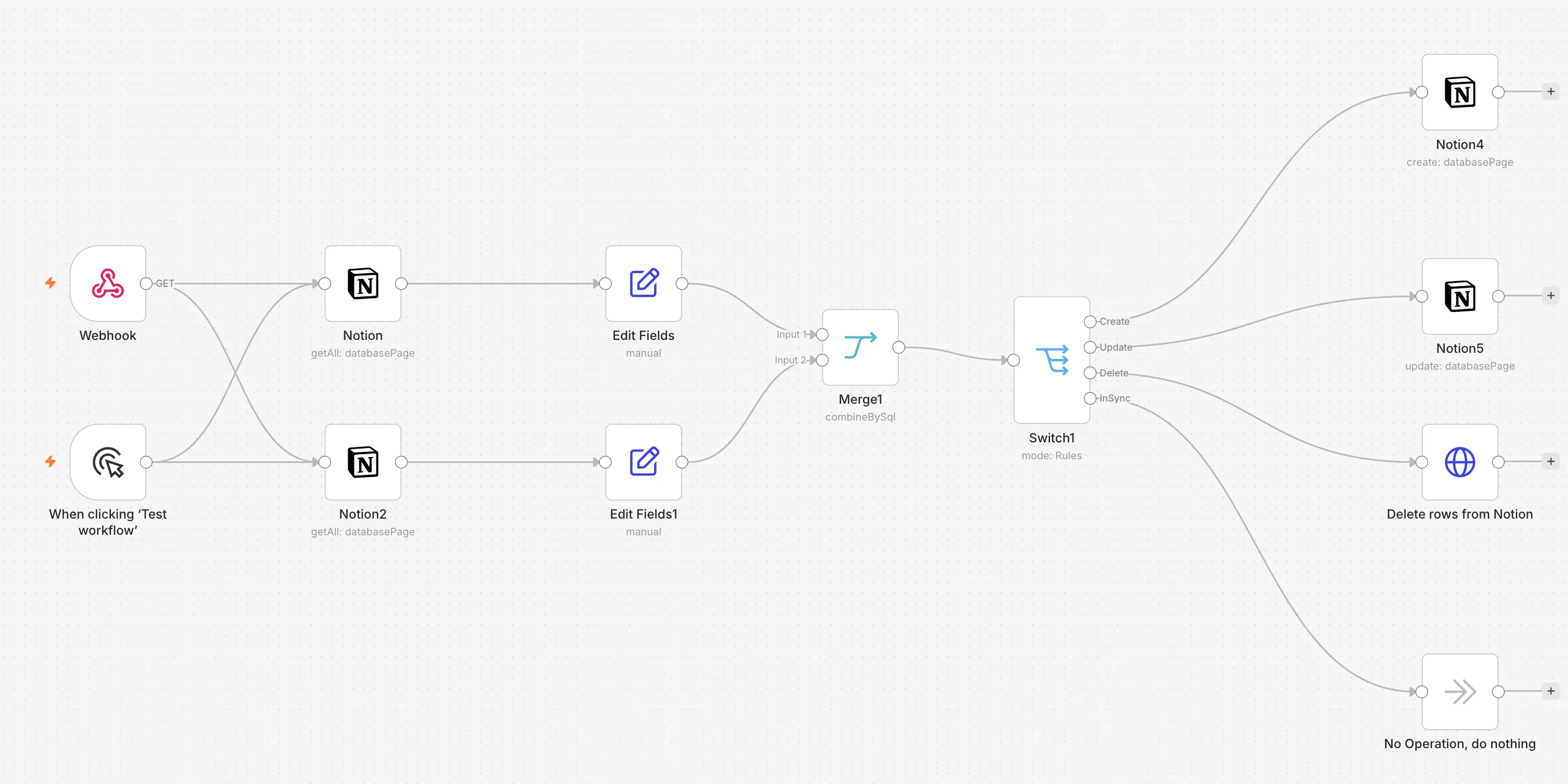
Status, service days, contacts and checklists mirror into a view-only copy.
Deletions carry over too, so nothing goes stale.
- Notion
- SituationWhat was happening
The office keeps one master list of companies in Notion — account number, name, address, status, service days, entry instructions, emergency contact, office phone, primary email and the employee checklist link. The field crew is not meant to edit any of that, so they read their own view-only copy of the same list. Keeping the two the same meant opening both, retyping every change into the copy, and remembering to take out a company that had gone. The list the crew actually reads was always a little behind the real one.
- TaskWhat had to change
The view-only list had to match the master list on its own — new companies added, changed details corrected, and companies no longer on the master taken out.
- ActionWhat we built
- The run starts when something calls its web address, or by hand from the button.
- Every company on the master list is read, sorted by account number, and anything with no account number is skipped.
- Every row already in the view-only copy is read as well, sorted the same way.
- Both lists are cut down to the same fields, so they can be compared like for like.
- The two lists are lined up against each other by account number and name.
- Each company comes out marked one of four ways: new, changed, already the same, or gone from the master.
- A new company gets a fresh page in the view-only copy, with all its details filled in.
- A changed company has its existing page written over with the current details. Where a company carries more than one status, the update writes the first one.
- A company that is gone from the master is archived out of the copy.
- A company that already matches is left alone.
- ResultWhat it changed
- The view-only list the crew reads is brought back in line with the master list without anyone copying anything across.
- New companies appear in it, changed details are corrected, and companies that have gone are archived out.
- Rows that already match are skipped, so a run only touches what actually changed.
- The office edits one list, and that is the only list anyone has to edit.
-
 HR & onboarding
Paystubs delivered to every employee
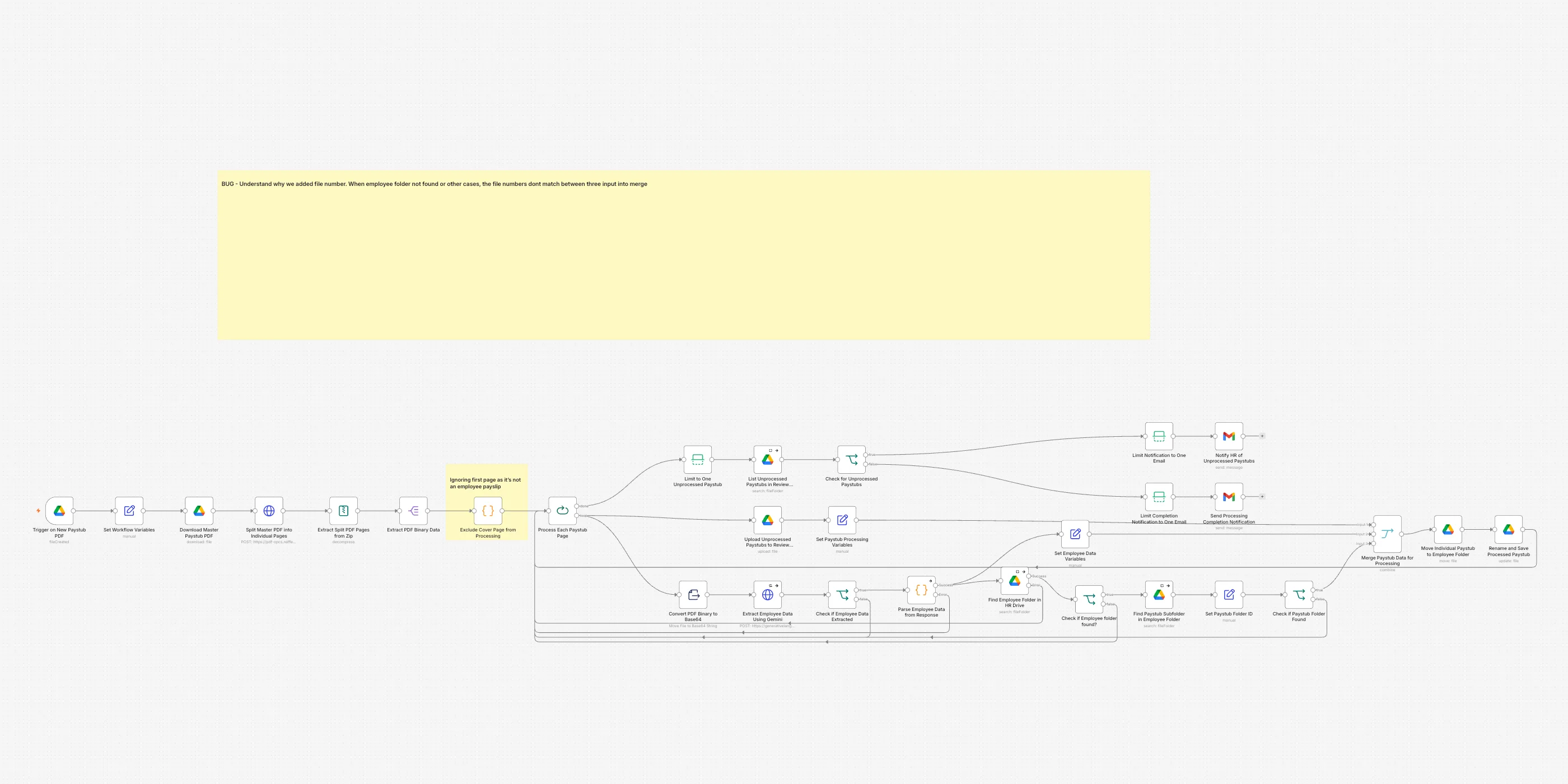
One master PDF goes in; every employee gets their own stub, filed privately.
HR gets an email if any stub cannot be matched.
- Google Drive
- Gemini AI
- Gmail
- SituationWhat was happening
Payroll arrives as one long PDF with every employee's stub inside it and a cover page on the front. Somebody opens it, works out where each page belongs, saves that page into the right person's folder and renames it. It is the same job every single pay run, and a page put in the wrong folder is a payslip one person cannot find and another should never have seen.
- TaskWhat had to change
Every page of the master PDF had to reach its own employee's paystub folder under a standard name, and any page that could not be matched had to end up somewhere visible rather than quietly lost.
- ActionWhat we built
- A new master paystub PDF lands in the Drive folder and starts the run.
- The PDF is sent away to be split, and comes back as one file per page.
- The cover page is dropped, because it is not anybody's payslip.
- The pages are handled one at a time.
- Each page is read by Gemini AI, which works out which employee the stub belongs to.
- That employee's folder is looked up in the HR drive, and then the paystub folder inside it.
- When both are found, the page is moved into that folder and renamed to the standard name.
- When the employee, their folder or the paystub folder cannot be found, the page goes to a review folder instead.
- At the end the review folder is checked, and HR gets one email — either listing what needs a person, or confirming there was nothing to do.
- ResultWhat it changed
- One master PDF becomes one correctly filed stub per employee.
- Each stub sits in that employee's own folder, under the same name pattern as every other stub.
- A page that cannot be matched is parked for review, never silently dropped.
- HR gets exactly one email per run, whether or not anything needs attention.
-
 HR & onboarding
New hires onboarded end to end
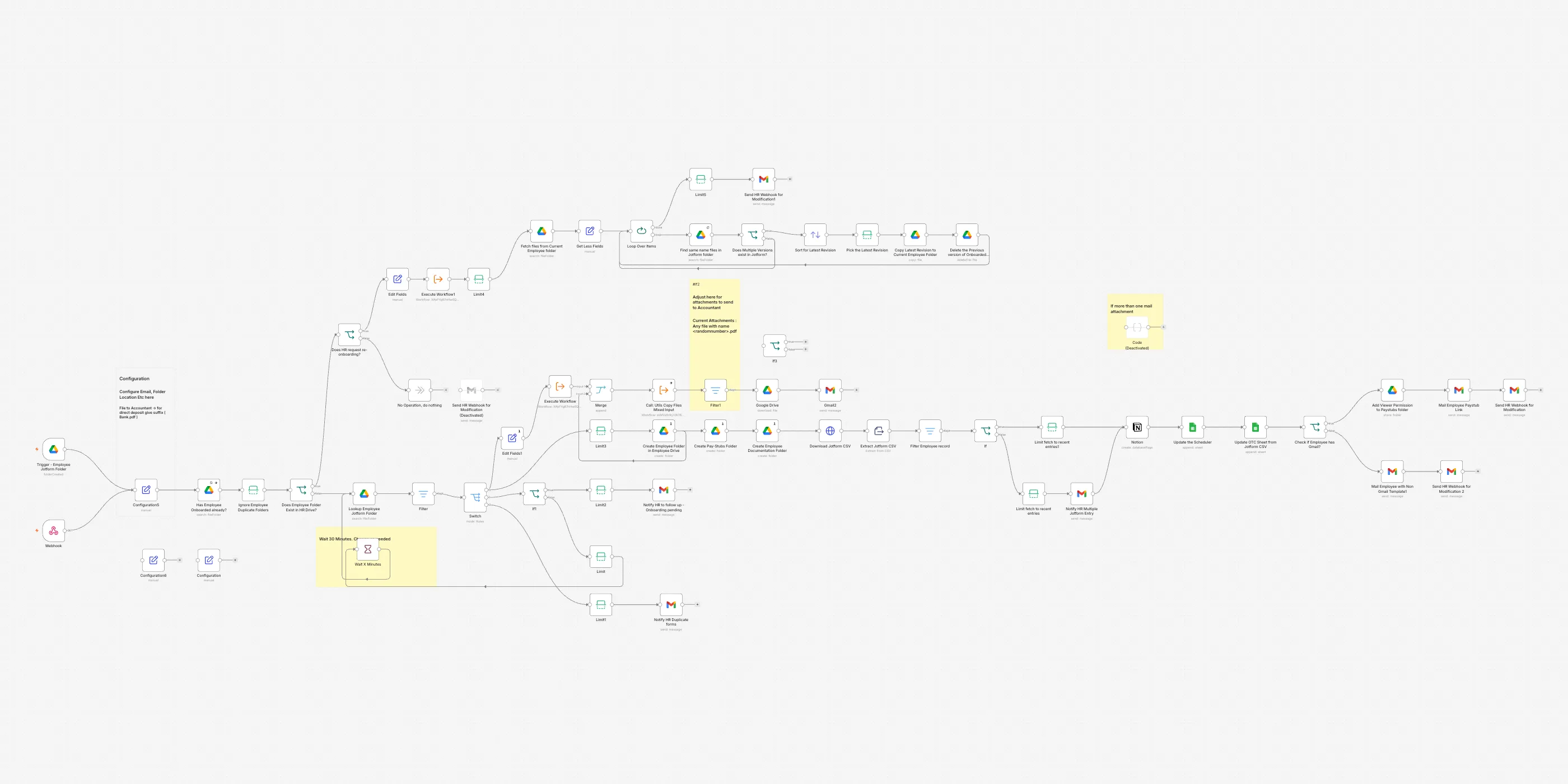
Documents checked, records created, welcome email sent — all by itself.
One workflow covers the whole first day.
- Google Drive
- Jotform
- Notion
- Google Sheets
- Gmail
- SituationWhat was happening
A new hire fills in one form, and somebody then has to turn that single submission into everything else: a folder for them, a paystub folder, a documents folder, a row on the scheduler, a record in the company database, the tax form off to the accountant and a welcome email. Half of it gets done on the first day and the rest gets remembered a week later.
- TaskWhat had to change
One completed form had to produce every folder, every record and every email on its own — and anything missing or sent twice had to land on HR's desk instead of being guessed at.
- ActionWhat we built
- A new submission folder appears in Drive and starts the run.
- The system waits a set number of minutes first, so every form belonging to one person has arrived before it looks.
- It checks whether that person already has a folder, so nobody is onboarded twice.
- If they sent more than one set of forms, or the set is not complete, HR is emailed and the run stops there.
- Otherwise their folder is created in the employee drive, with a paystub folder and a documents folder inside it.
- The form answers are downloaded as a spreadsheet and narrowed to that one person's row.
- They are added to the company database in Notion, to the scheduler sheet, and to the payroll import sheet.
- Their tax form is taken out of their folder and emailed to the accountant.
- If they gave a Gmail address, their paystub folder is shared with them and they are emailed the link; if not, they are asked for one.
- HR gets a closing email saying the onboarding went through.
- ResultWhat it changed
- One form submission creates every folder, record and email without anyone opening Drive.
- Duplicate submissions and half-finished forms reach HR as a message, instead of becoming a half-finished employee.
- The new hire can see their own paystubs from the first day, and nobody else's.
- Onboarding someone again replaces their old documents with the newest version instead of leaving both behind.
-
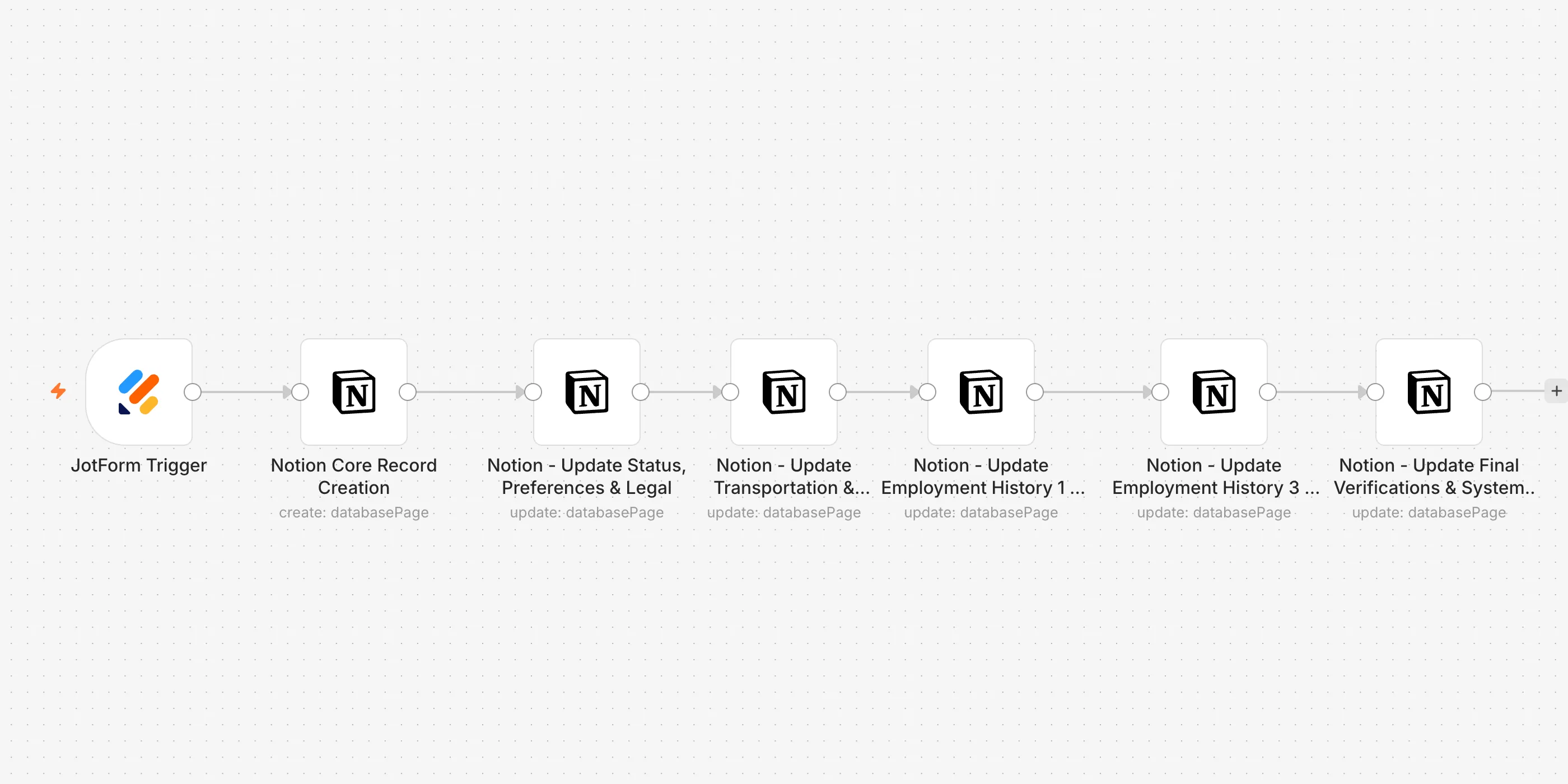 HR & onboarding
Job applications sorted into one database
Every application lands fully structured in your database as it is submitted.
Over 40 answer fields mapped automatically.
- JotForm
- Notion
- SituationWhat was happening
The job application form is long. It asks for contact details, the position wanted, availability for every single day of the week, the cities someone can work in, four past employers with addresses and supervisors, and a set of legal questions. Every time one came in, somebody opened it and copied the answers into the hiring database by hand. That is dozens of boxes per applicant, and it only takes one skipped line or one answer in the wrong column for a record to be wrong.
- TaskWhat had to change
Every submitted application had to arrive in the hiring database as a complete, correctly filled-in record, without anyone copying an answer across.
- ActionWhat we built
- An applicant submits the job application form.
- A new record is created in the applications database in Notion, named after the applicant, stamped with the date and marked as a new application.
- (delete this step and fold it into the previous one) "A new record is created in the applications database in Notion — named after the applicant, stamped with the date, marked as a new application, and carrying their contact details, the position applied for and the date they can start."
- The record is topped up with the referral question, how they heard about the job, the pay they want, whether they are working now, how they would rather be contacted, and the questions about being allowed to work and being able to do the job.
- Transport and what kind, driving licence, the days and shifts they can work, the cities they can work in, the hours they want per week and their hours for each day of the week are added next.
- The question about being let go from a past job goes in, along with the first two past employers — company, address, dates, phone, supervisor and duties.
- The third and fourth past employers are added the same way.
- The last two checks go in: that they understand their documents will be verified before they start, and whether they can do a video interview.
- ResultWhat it changed
- An application is in the database the moment it is sent, with every mapped answer already in place.
- Answers land in the right kind of field — tick boxes and pick lists — so applicants can be filtered and compared.
- Every record arrives marked as a new application, so it is clear which ones nobody has looked at yet.
- Nobody re-types an answer.
-
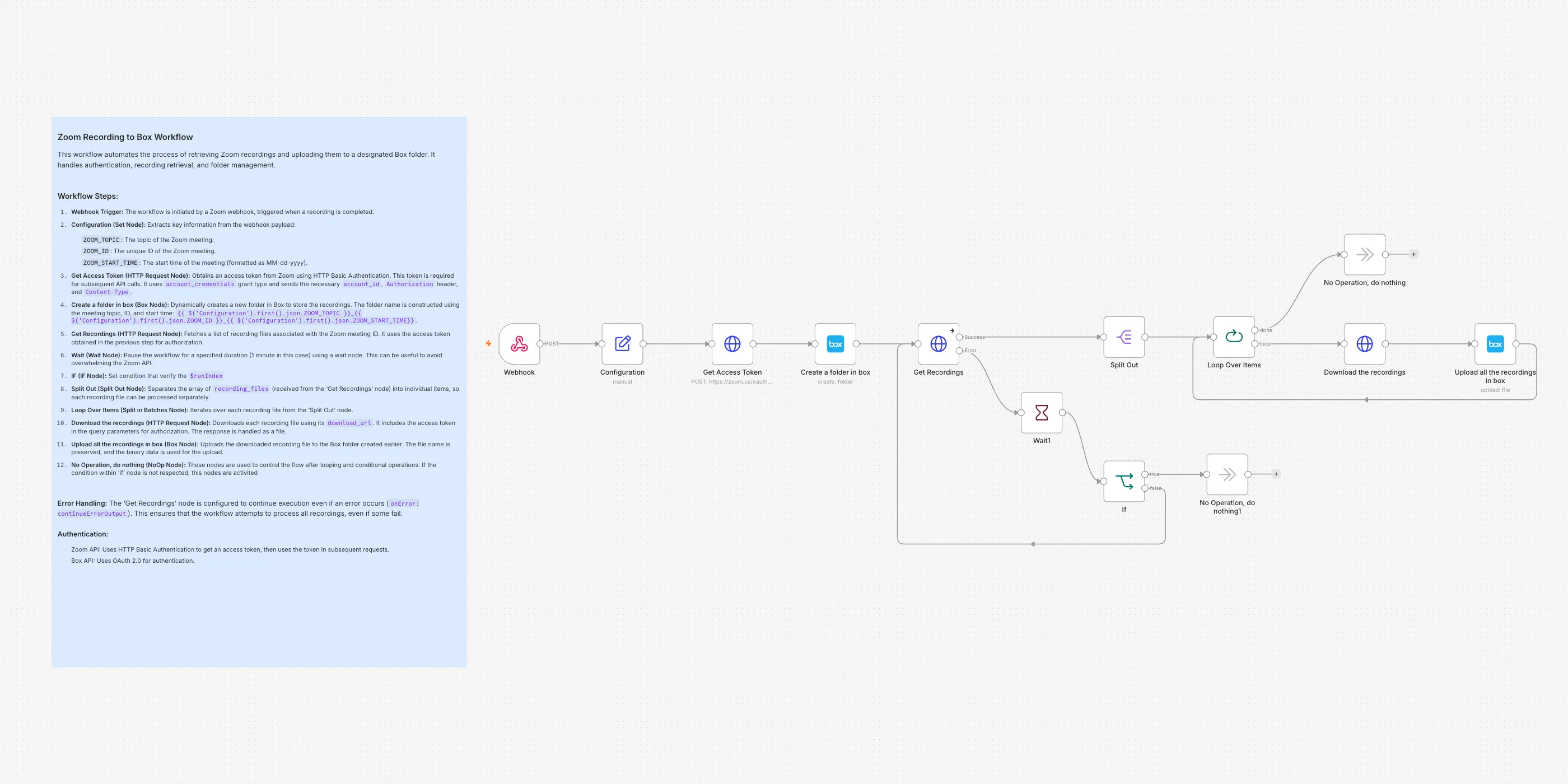 Meetings & calls
Zoom recordings archived properly
Every finished recording is filed into a tidy, named folder.
Every file the meeting produced, kept together.
- Zoom
- Box
- SituationWhat was happening
A finished Zoom recording sits in Zoom until somebody goes and fetches it. Someone signs in, finds the right meeting, downloads the files one at a time, then makes a folder in Box and drags them across. The folder gets named however the person felt like naming it that day, so nothing lines up later. Anything nobody remembers to fetch stays in Zoom, where the rest of the team never sees it.
- TaskWhat had to change
Every meeting's recording files had to end up in Box, together, in a folder named the same way every time, without anyone downloading a thing.
- ActionWhat we built
- Zoom calls the workflow the moment a meeting's recording is finished.
- We take the meeting's topic, its id and its start date off that call.
- We sign in to Zoom for a fresh access token.
- A folder is created in Box, named after the meeting: topic, meeting id and date.
- We ask Zoom for the list of files it made for that meeting.
- If that call to Zoom fails, the run waits a minute and asks again, and gives up after a set number of tries instead of looping forever.
- The list is split into single files.
- Each file is downloaded from Zoom, one at a time.
- Each one is uploaded into that meeting's Box folder, keeping its own file name.
- The loop moves on to the next file until they are all in.
- ResultWhat it changed
- Recordings land in Box on their own, in a folder named after the meeting, its id and its date.
- Every file the meeting produced goes into that same folder, so no file gets missed.
- All the meeting folders sit under one Box folder, so they are easy to find.
- Nobody downloads a recording or drags it anywhere.
-
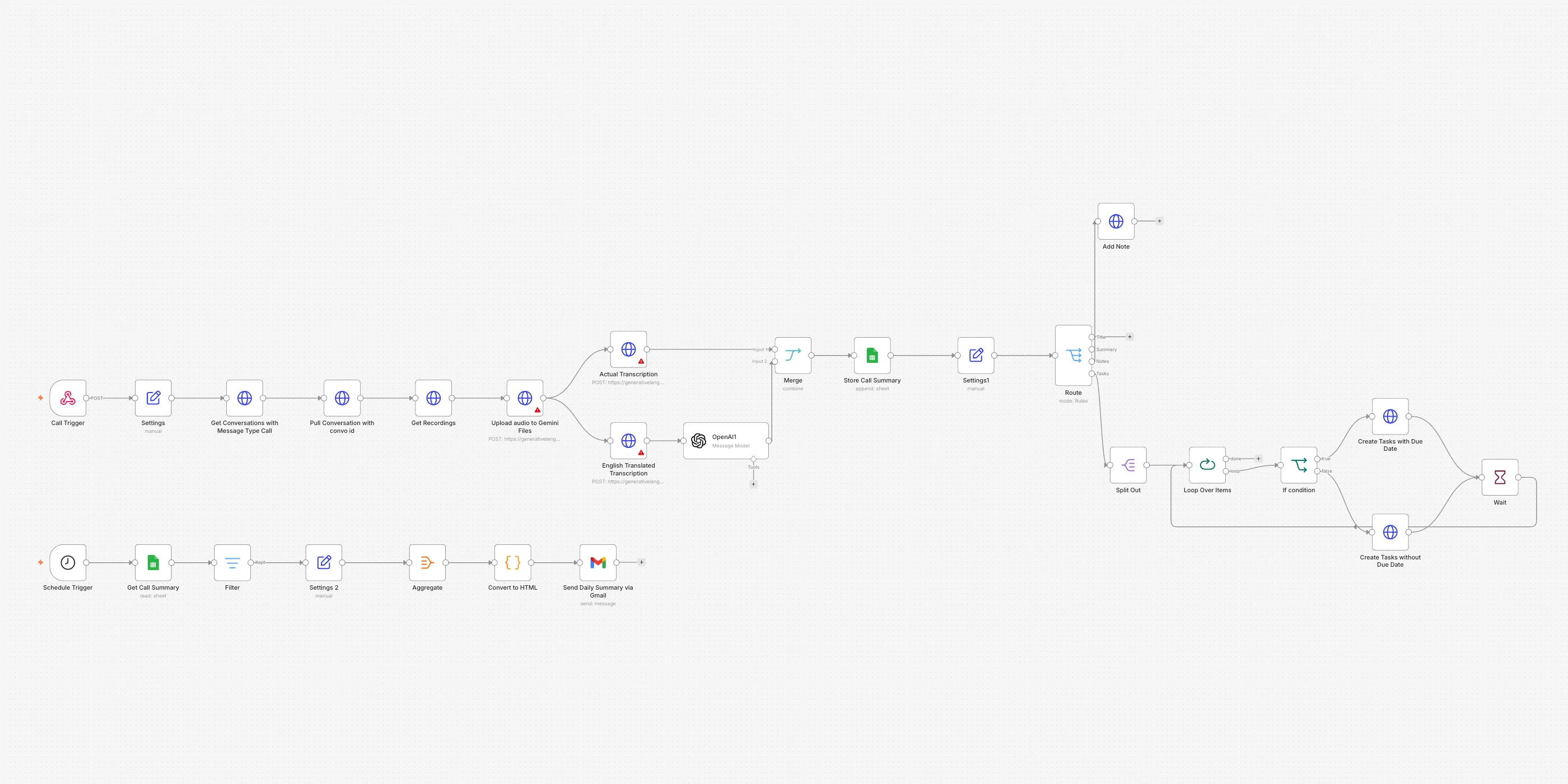 Meetings & calls
Calls transcribed, summarized and turned into tasks
Call recordings become summaries, CRM notes and task lists on their own.
Original language and English, on every call.
- GoHighLevel
- Gemini AI
- OpenAI
- Google Sheets
- Gmail
- SituationWhat was happening
Every call leaves a recording in the CRM and nothing else. To find out what was said, somebody plays it back. To act on it, they type a note onto the contact and then make themselves a task so the follow-up is not forgotten. A call in another language gets skipped altogether.
- TaskWhat had to change
Each recorded call had to end up as a written note on the contact, with its follow-ups already created as tasks, and the day's calls had to be readable without opening the CRM at all.
- ActionWhat we built
- A call finishes and the CRM calls the workflow.
- The conversation is looked up in the CRM and the recording is pulled out of it.
- The audio is uploaded to Gemini AI and written out as it was spoken.
- A second pass returns the English version, so a call in any language can still be read.
- AI turns the transcript into a short summary with the follow-up points.
- The summary is written to a sheet, so there is a record of it outside the CRM.
- A note is added to that contact in the CRM.
- The follow-up points are split up and created as CRM tasks one at a time, with a due date where the call gave one and without where it did not.
- Separately, once a day, the sheet is gathered up, formatted and emailed out as the day's call summary.
- ResultWhat it changed
- Every recorded call becomes a written note on the contact without anyone listening back to it.
- A call in another language is still readable, because both the spoken version and an English one are kept.
- Follow-ups exist as real tasks with due dates, instead of as something somebody has to remember.
- Management gets one email a day covering every call.
-
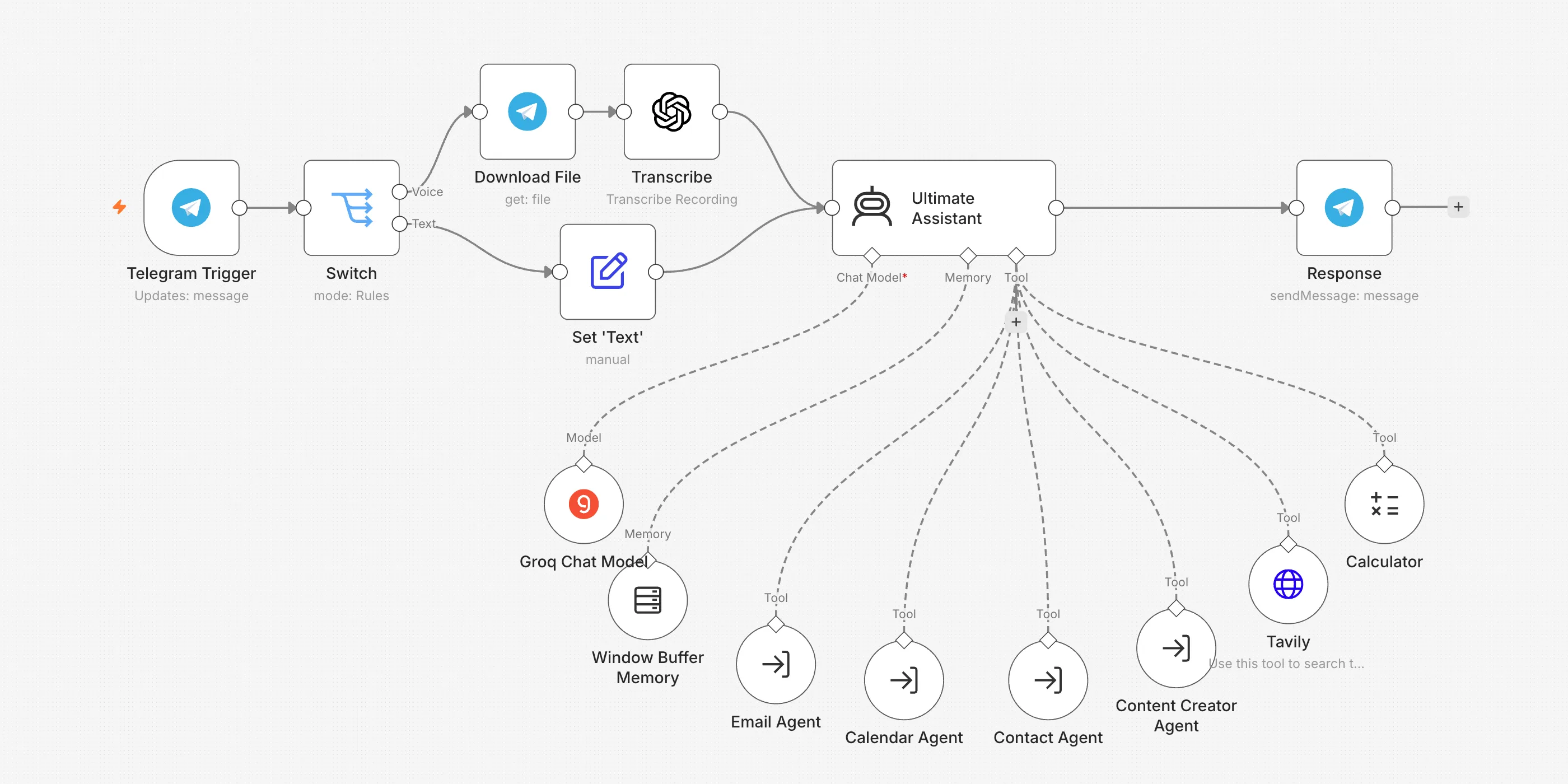 AI assistants
A personal AI assistant on Telegram
Talks by text or voice and actually does the work: email, calendar, news.
Understands voice notes as well as text.
- Telegram
- OpenAI
- Groq
- Tavily
- SituationWhat was happening
The small stuff eats the day. Sending one email means digging out the address first, then writing it, then sending it. Booking a time means opening the calendar, and checking a fact means opening a browser. All of it sits on a laptop, so nothing moves while you are walking, driving or between meetings.
- TaskWhat had to change
One chat on your phone had to be enough to send the email, book the time, find the contact and look something up — whether you typed it or said it.
- ActionWhat we built
- A message arrives in the Telegram chat with the assistant.
- The system checks whether it is a voice note or typed text.
- A voice note is downloaded from Telegram and turned into text.
- Typed messages are taken straight through as text.
- The assistant reads the request and decides which helper it belongs to.
- When an email or an invite needs a person's address, contacts are looked up first and the address is passed on.
- Email, calendar, contacts and blog posts each go to their own helper; news searches and sums are handled on the spot.
- The answer is sent straight back into the same Telegram chat.
- ResultWhat it changed
- You ask in plain words on your phone and the work gets done.
- A voice note works as well as typing, so you can ask without stopping to type.
- The address is looked up before an email goes out, so you do not have to remember it.
- Every chat keeps its own thread, so a follow-up carries on from the messages just before it.
-
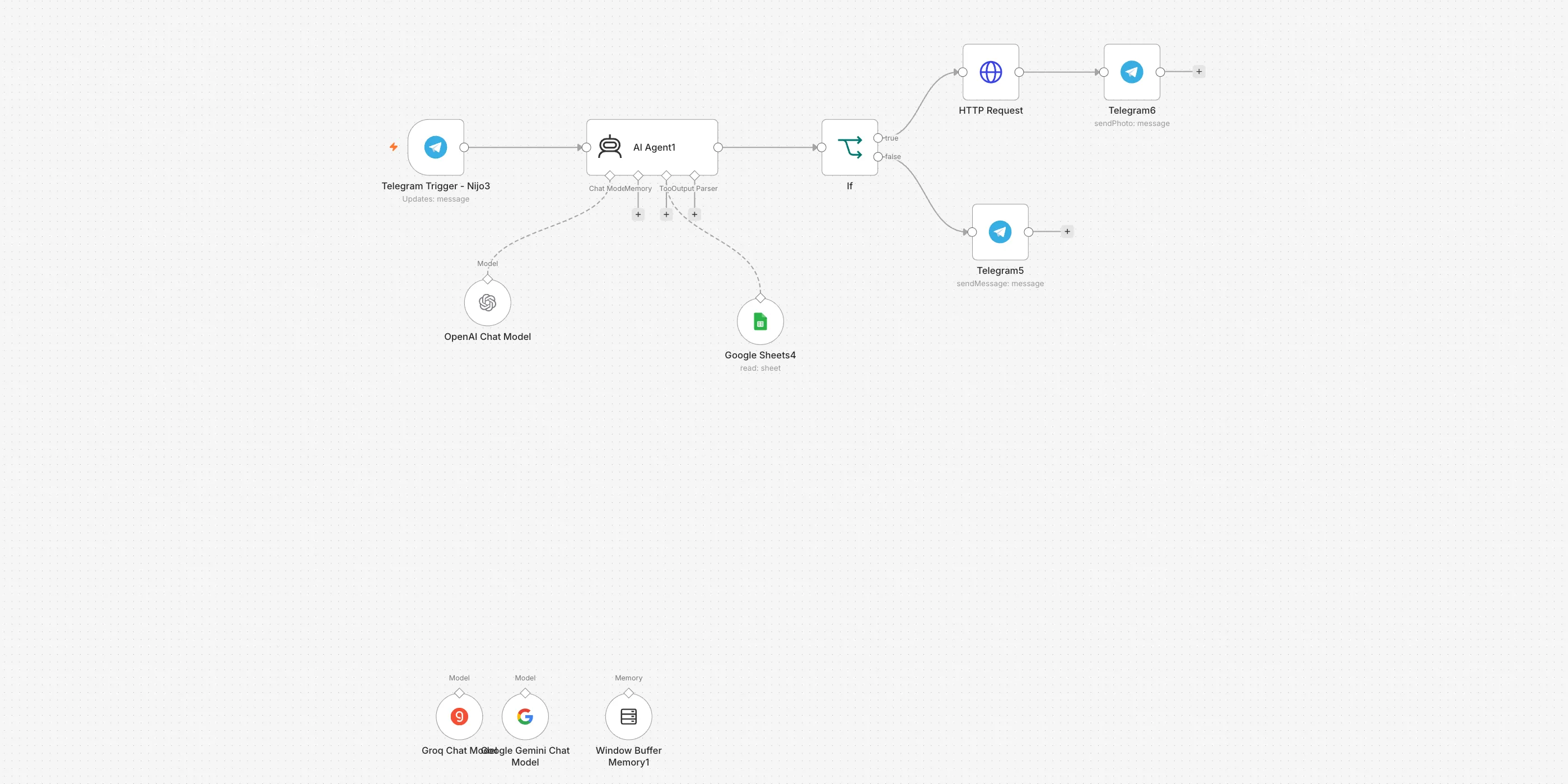 AI assistants
Charts on demand, in plain English
Ask for a chart in Telegram and get one back, built from your live data.
Built from the sheet as it reads at that moment.
- Telegram
- Google Sheets
- OpenAI
- QuickChart
- SituationWhat was happening
The holdings live in a Google Sheet — name, symbol, quantity, last price, what each one is worth. A long column of numbers tells you very little at a glance. To see the shape of it, someone had to open the sheet on a computer, pick the right columns and build a chart by hand, every time. From a phone it was not worth the trouble at all.
- TaskWhat had to change
Anyone should be able to ask for a chart in plain words in a chat and get the picture back, drawn from what the sheet says at that moment.
- ActionWhat we built
- Someone sends a message in Telegram, such as "show me a pie chart of my portfolio".
- The assistant reads the request and decides which chart to draw — a bar chart if you did not say.
- It reads the rows from the portfolio tab of the Google Sheet.
- It works out the figures behind the chart — a total, an average, or quantity times price for value.
- It writes the chart out as a web address for the chart service, with the labels and the figures inside it.
- The reply is checked. If it is not a chart address — usually a question back, because the request did not say enough — that text is sent to the chat and the run stops there.
- When it is a chart address, the picture is fetched from it.
- The picture is sent straight back to the same Telegram chat as an image.
- ResultWhat it changed
- A chart comes back in the chat as a picture, from the phone already in your hand.
- The figures are read from the sheet at the moment you ask, so the chart matches what is in there now.
- A vague request gets a question back rather than the wrong chart.
- Nobody opens the spreadsheet to build a chart by hand.
-
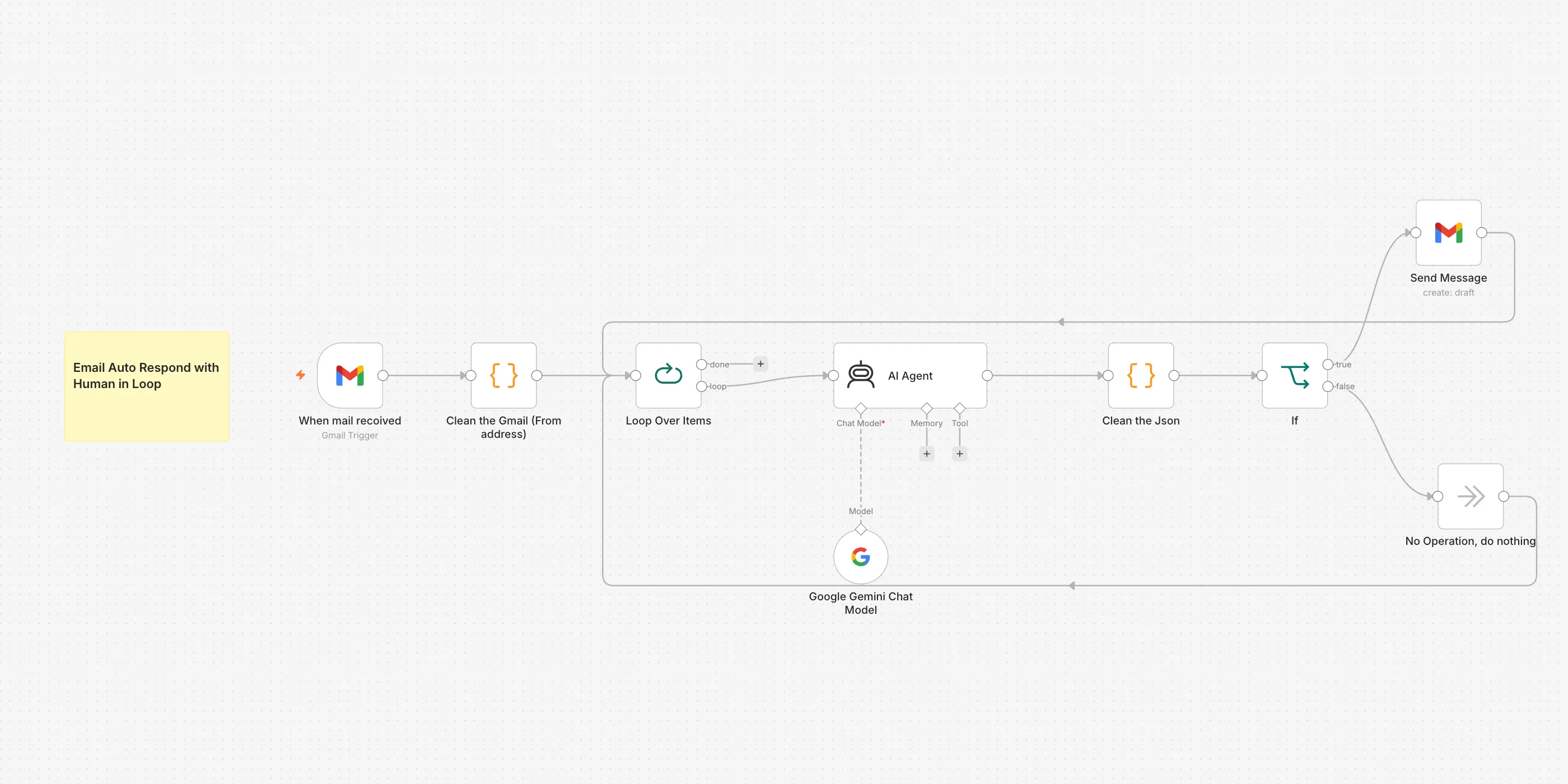 AI assistants
Email replies drafted for you
Mail that needs an answer arrives with a reply already written, waiting in drafts.
Every reply stops in your drafts — nothing sends itself.
- Gmail
- Gemini AI
- SituationWhat was happening
The inbox fills up all day. Most of it needs no answer, but you still have to open each message to find that out. The ones that do need a reply get the same few polite lines, typed out again from scratch. By the time you have worked through them, the useful part of the morning is gone.
- TaskWhat had to change
Every email that actually needed an answer had to arrive with a reply already written, and nothing was allowed to leave the account without a person seeing it first.
- ActionWhat we built
- Gmail is checked for new mail every minute, and anything new is picked up.
- The email addresses on the message are tidied so only the plain address is left.
- The emails are handled one at a time.
- Gemini AI reads the subject and the opening of the message and decides whether it needs an answer.
- It looks for a direct question, a request, a thread already running, or anything urgent — and if it cannot tell, it treats the mail as needing a reply.
- When a reply is needed, it writes a short, polite one along with a subject line.
- That reply is saved as a draft in Gmail, waiting for you to check it.
- Mail that needs no answer is passed over with nothing written.
- The run moves on to the next email.
- ResultWhat it changed
- The replies that matter are written before you open the inbox.
- Mail that needs no answer never turns into a draft.
- Nothing leaves the account on its own — every reply waits for a person to read it and press send.
- The typing is done. The judgement is still yours.
-
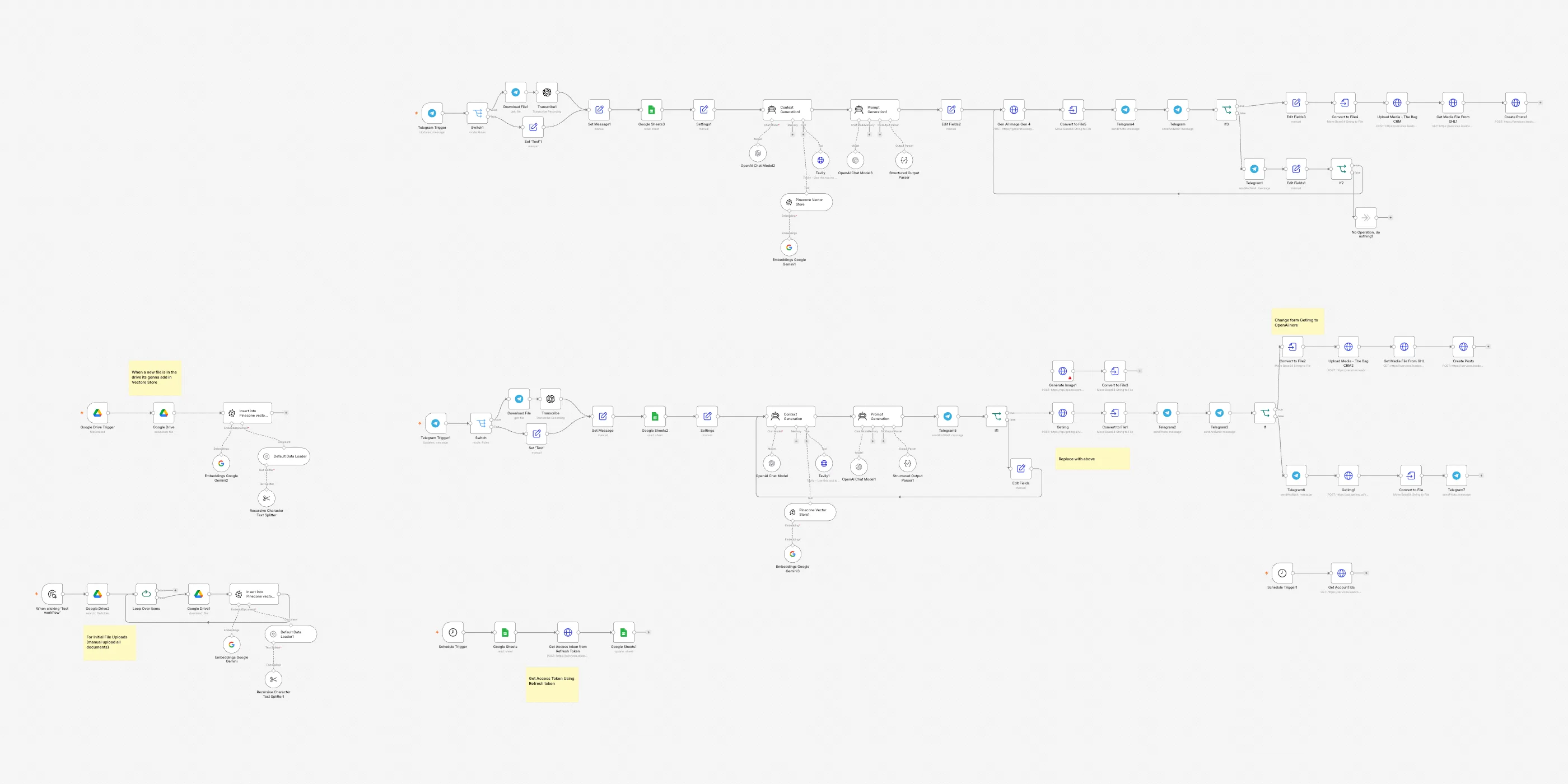 Marketing & leads
A content machine with human approval
Drafts posts from your own documents, then waits for your yes.
Nothing publishes without your yes.
- Telegram
- Google Drive
- Pinecone
- OpenAI
- Tavily
- SituationWhat was happening
Posting for the business meant sitting down and starting from nothing. Somebody had to think of the idea, dig up what the company actually says about itself, find a picture that fitted, and write the caption to go with it. Every post was a small project of its own, and the ones that never went out were the ones nobody had time to begin.
- TaskWhat had to change
A post had to be able to start as one message from your phone, A post had to be able to start as one message from your phone, come back as a finished picture with a caption written for it, and only be created once a person had said yes., and only be created once a person had said yes.
- ActionWhat we built
- A new document dropped into the company folder in Google Drive is read and added to the knowledge base on its own.
- You send the idea for a post to Telegram, either typed or spoken as a voice note.
- A voice note is written out as text first, so both kinds of message carry on the same way.
- The login for the posting tool is picked up from a Google Sheet, which a scheduled run keeps fresh so nobody reconnects the account by hand.
- An assistant pulls the relevant facts out of your own documents, and searches the web as well when the message needs something recent.
- A second assistant turns that into a brief for the picture and the caption that goes with it.
- The picture is generated and sent straight back to you in the Telegram chat. In one build of the flow the written brief comes to the chat for a yes first, and a no sends it back to be rewritten.
- You approve or decline it there. Decline, and the chat asks you for your own wording and makes a new picture.
- Once approved, the caption goes to the posting tool as a new post for the connected accounts, with the image uploaded into the tool's media library alongside it.
- ResultWhat it changed
- A post starts as one message from your phone, typed or spoken out loud.
- What it says is drawn from a knowledge base built out of your own documents, so it sounds like the company and not a stranger.
- You see the picture in the chat and either approve it or ask for another.
- Nothing reaches the connected accounts until you have said yes.
-
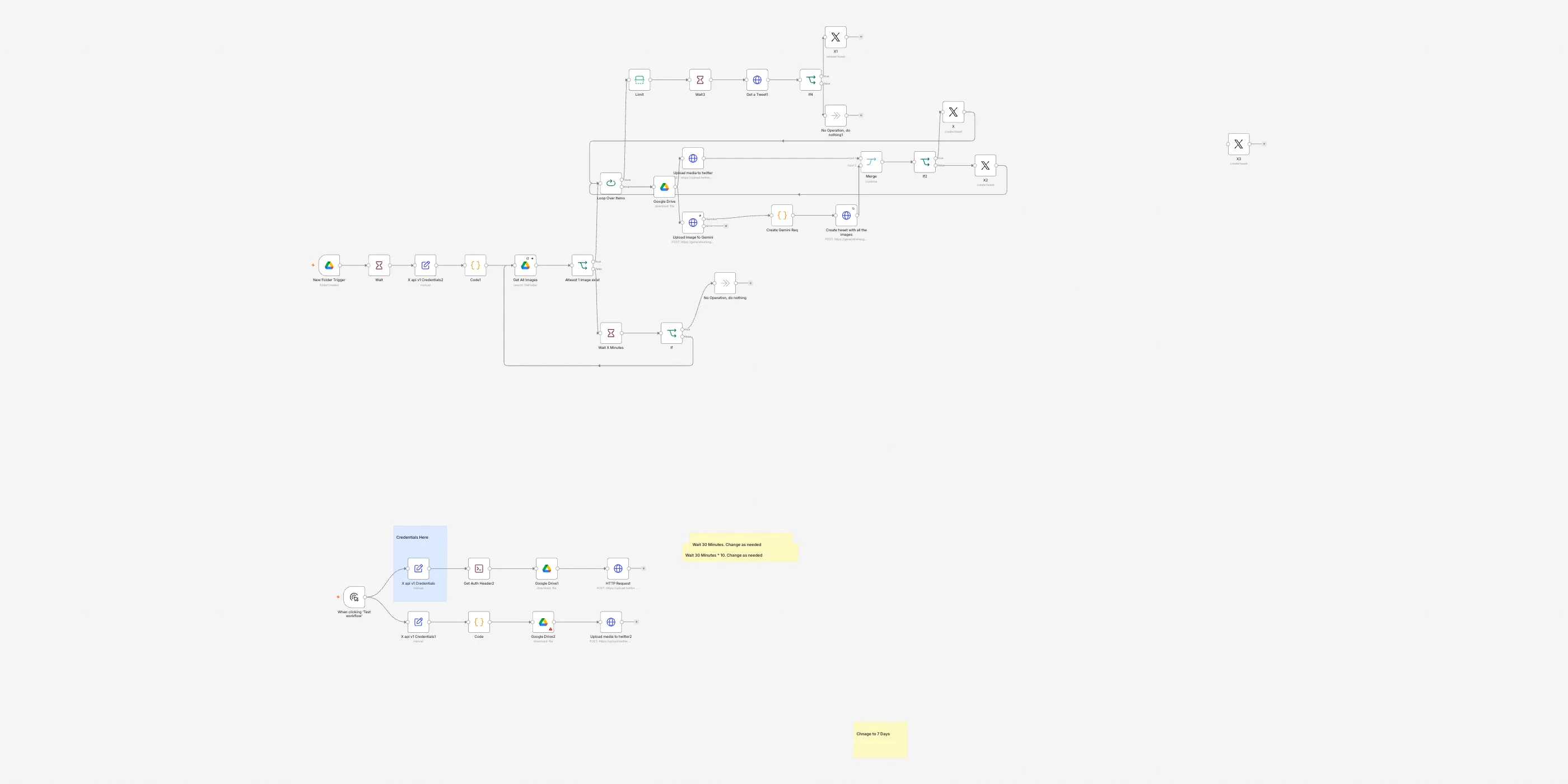 Marketing & leads
Slides turned into a Twitter thread
AI reads a deck of slide pictures and posts one message per slide on X.
Each post is paired with its own slide.
- Google Drive
- Gemini AI
- Twitter/X
- SituationWhat was happening
A finished slide deck is a good thread waiting to happen, but turning it into one is an afternoon of clicking. Somebody opens every slide, writes a post for it, saves the slide as a picture, attaches it, and posts each one under the last without breaking the chain. Get the order wrong and the thread reads backwards. Most decks never make it out at all.
- TaskWhat had to change
A folder of slide pictures dropped into Drive had to come out as posts on X, every post written from its own slide and posted with that slide attached, in order, without anyone typing a word., every post written from its own slide and posted with that slide attached, in order, without anyone typing a word.
- ActionWhat we built
- A new folder appears in the Drive folder we watch — that is a deck, saved one picture per slide.
- The system waits half an hour, so the whole deck has time to finish uploading.
- It lists up to ten slides in that folder. If none have landed yet it waits another half hour and looks again, and gives up after about a dozen looks rather than posting an empty thread.
- The slides are handled one at a time.
- Each slide is downloaded from Drive and sent two ways at once: up to X as a picture, and up to the AI to be read.
- The AI reads the picture of the slide and writes the post: a hook first, then the key points, under 280 characters.
- The wording and the picture are put back together, and the post goes out on X with its slide attached.
- The first two slides go out as posts of their own. From the third slide on, each post is a reply under the first one.
- When the deck runs out, the system waits two minutes, then checks the likes on one of the posts once. Fifty or more and it reposts it.
- ResultWhat it changed
- A folder of slide pictures dropped into Drive becomes a posted thread on its own.
- Every post is written from the slide it carries, and that slide is attached to it.
- Posts go out in slide order. The first two stand on their own, and the rest hang under the first one.
- A post already sitting on fifty likes two minutes after it goes out gets reposted without anyone watching it.
What clients say
Since you guided me through the initial steps with n8n, I've made significant progress. I've founded a SaaS development company specializing in AI-powered chatbots. We already have a good number of clients, and that number is growing daily. I've invested thousands of hours in development, and I have a team of 25 people working on it. We're embarking on a new phase, installing self-service kiosks in restaurants, hotels, and retail outlets.
Very good work and communication. We'll definitely do it again. Thank you.
Great to work with.
Let's talk about your workflow
Tell us what your team does by hand. We will tell you what is worth automating.